Programming - From Base to AceProgramming - From Base to Ace
  • Introduction

    • About this Course
  • Developer tools

    • Visual Studio Community
    • Visual Code
    • Git and GitHub
  • Version control fundamentals

    • Basics of Git and GitHub
    • GitHub Teamwork
  • Introduction to Programming

    • 01 - Computer Programming
    • 02 - Basic Building Blocks
    • 03 - Starting in C#
    • 04 - Storing Data
    • 05 - Processing Data
    • 06 - Getting User Data
    • 07 - Methods
    • 08 - Making Decisions
    • 09 - Loops
    • 10 - Strings
    • 11 - Arrays
  • Object Oriented Thinking

    • 21 - Abstraction
    • 22 - All About Objects
  • Object Oriented Programming

    • 24 - Defining Custom Classes
    • 25 - Getters, Setters and Properties
    • 26 - Constructors
    • 27 - Composition
    • 28 - Interfaces
    • 29 - Inheritance
  • Advanced Topics

    • 41 - Handling Exceptions
    • 42 - Creating Libraries
    • 43 - Unit Testing
  • WPF

    • 50 - Introduction to WPF
  • Tutorials

    • Terminal Selection Menu

Visual Code

Visual Studio Code is a lightweight but powerful source code editor which runs on your desktop and is available for Windows, macOS and Linux. It comes with built-in support for JavaScript, TypeScript and Node.js and has a rich ecosystem of extensions for other languages and runtimes (such as C++, C#, Java, Python, PHP, Go, .NET).

Installation

Google for visual code or navigate to https://code.visualstudio.com/.

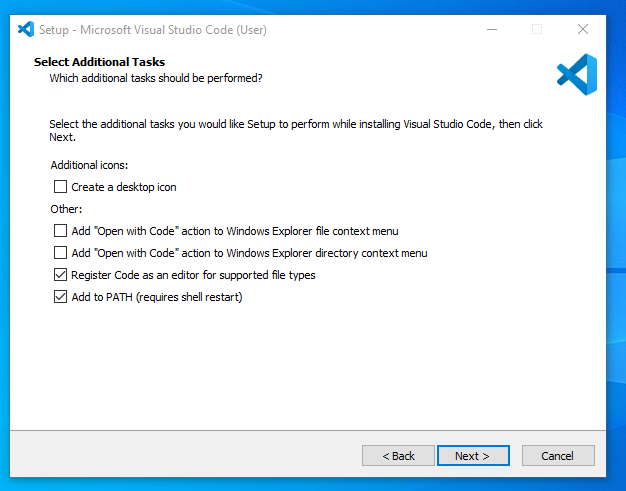
Hit the Download for Windows button and wait for the installer to download and then start it.
IMAGE

Select both Add Open with Code ... options.

Last Updated:: 10/1/24, 6:44 AM
Contributors: Ronny Mees
Prev
Visual Studio Community
Next
Git and GitHub